AxisFinancial

Procurement & accounts

The buying and the books, at last in the same system.

A requisition becomes an order, the order becomes a delivery, the delivery becomes a payment — and every one of them writes itself into a real double-entry ledger on the way past. Nobody re-types anything, and the trial balance is never a week behind.

Up and running in an afternoon · Works on a phone · Your books stay yours

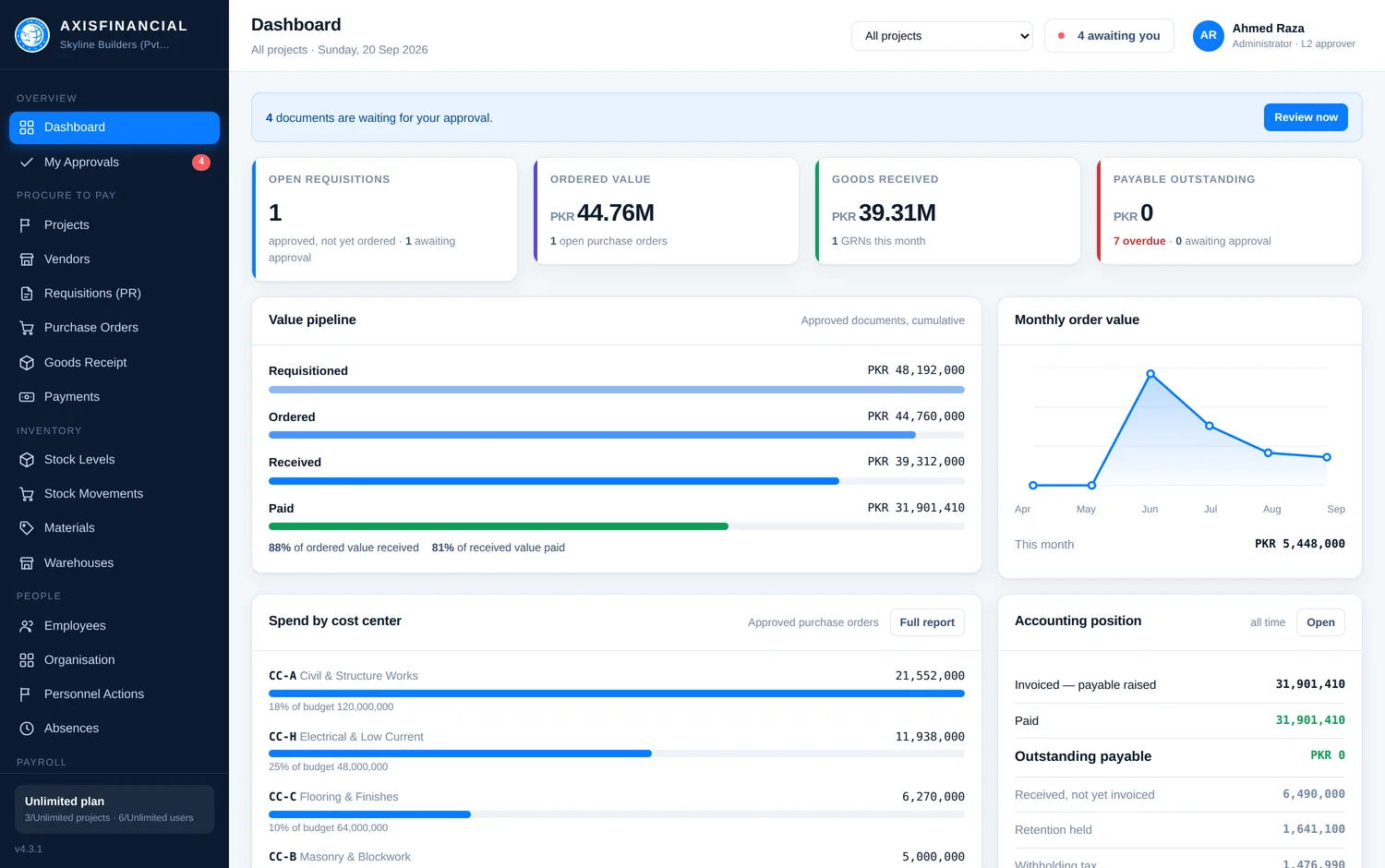
axisfinancial — dashboard
The dashboard: open requisitions, ordered value, goods received and payable outstanding, with the value pipeline underneath.
One screen, first thing in the morning. What has been asked for, what has been ordered, what has arrived, and what is still owed.
34modules, each with its own read, write or no-access setting per role
2approvals on every document before it is allowed anywhere near the ledger
0journal entries anybody types by hand — the documents post themselves
11report tabs, plus a builder for the ones nobody thought of yet

The problem

The site orders. The office finds out at month end.

Purchase orders live in one register, deliveries in a store keeper's notebook, and the accounts in a spreadsheet somebody rebuilds every quarter. By the time the three are put side by side, the money is gone and nobody can say against what. AxisFinancial is the same three things kept in one place, so the question never has to be reconstructed.

One number, one origin

The figure on the payment voucher came off the goods receipt, which came off the purchase order, which came off the requisition. Click back along it and you reach the person who first asked for the thing, and the reason they gave.

It posts itself

Approve a payment and the journal is written — payable debited, bank credited, withholding tax and retention split off to their own accounts. There is one function in the whole system that writes to the ledger, and it refuses an entry that does not balance.

Nobody sees what they shouldn't

A store officer books goods in and never sees a rupee of the financials. The permission grid is checked in the router, not in the menu, so a URL somebody guesses gets the same answer as a link they cannot see.

For whoever does the buying

An order that already knows what it is for.

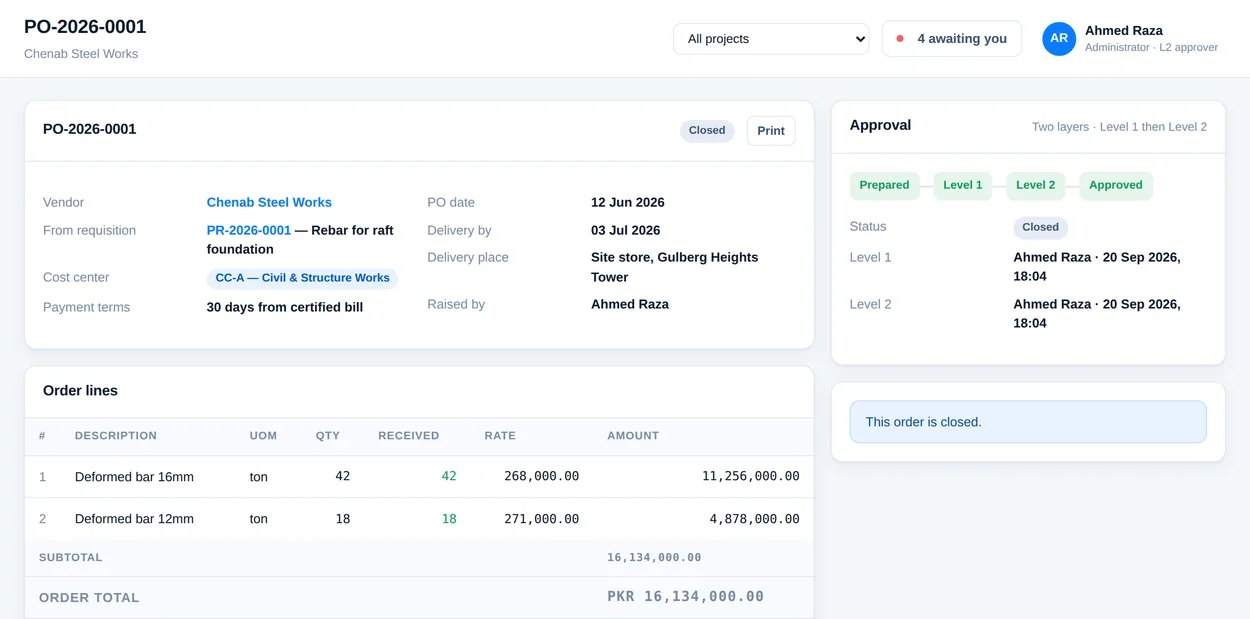
Pick the approved requisition and the purchase order fills itself in — lines, quantities, cost centre, project. Change what the vendor actually quoted, add the terms, send it for approval. The only thing anybody types is what changed.

  • Vendors go through their own approval before anyone can order from them
  • Rates, taxes, discount and freight on the document, not in somebody's head
  • Print or email a proper order with your company's letterhead on it
  • Partial deliveries handled — the order stays open for the rest
axisfinancial — purchase order
A purchase order showing its lines, vendor, cost centre and approval position.

For the person deciding

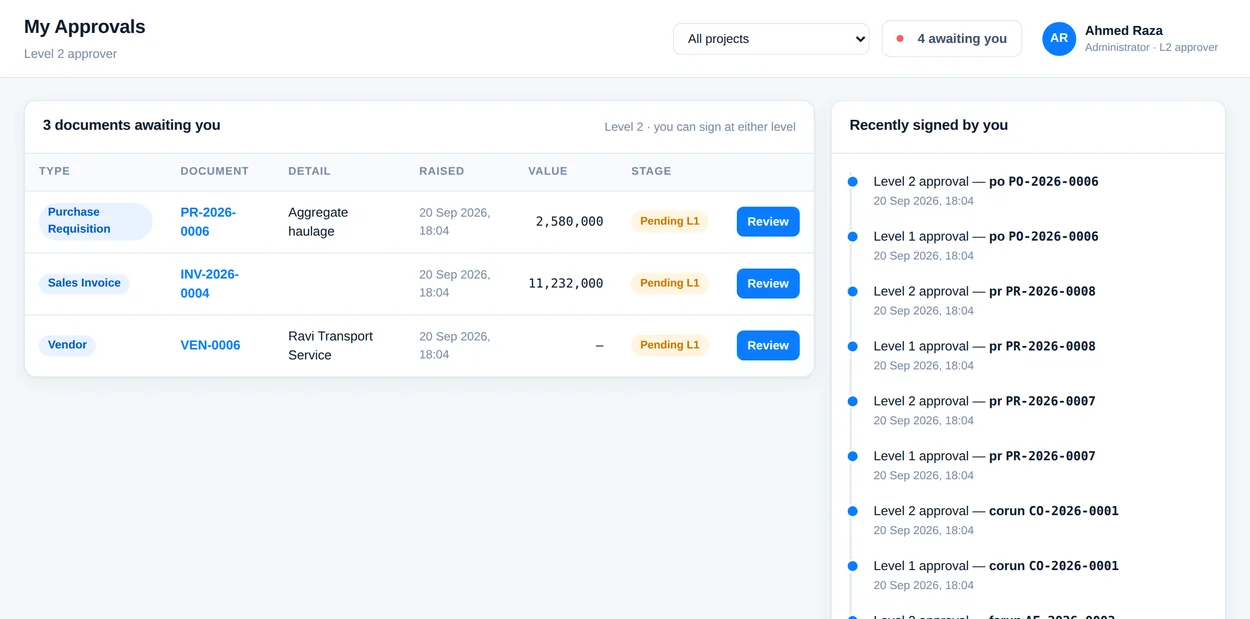
One list. Everything waiting on you, and nothing that isn't.

Two layers on every document: somebody who knows whether it is right, then somebody who knows whether it is affordable. Both see the value, the project and the budget position on the same screen as the button.

  • Approve, or send it back with a reason the requester actually reads
  • The same two roles on every document type — nothing to memorise
  • Every decision kept: who, when, and what they wrote
  • Works properly on a phone, because approvers are rarely at a desk
axisfinancial — my approvals
The approvals inbox listing documents waiting on the signed-in user.

For finance

A payment voucher, not a note to the bank.

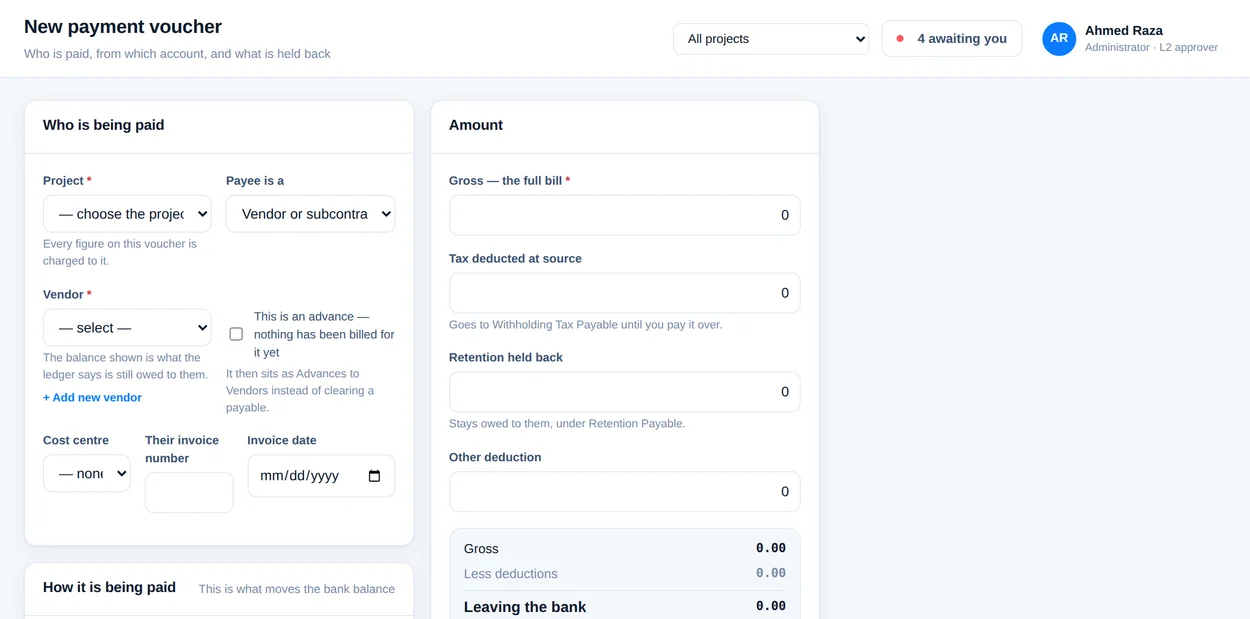
Project, bank, payee, cheque or online, withholding tax, retention, advance against a running bill — all on one form, all on the printed voucher, and all in the journal the moment it is approved. Nobody reconciles this afterwards because there is nothing to reconcile.

16,134,000 one voucher, split four ways, balanced to the rupee — the entry is below
axisfinancial — payment voucher
The payment voucher form with project, bank, payee, tax and retention fields.
PV-2026-0001 · against rebar for raft foundationDebitCredit
2100   Accounts Payable16,134,000—
1121   Meezan Current—14,601,270
2130   Withholding Tax Payable—726,030
2120   Retention Payable—806,700
PKR16,134,00016,134,000

Nobody typed this. It is what the system wrote when the voucher was approved — and the tax and the retention went to their own accounts on the way, which is what makes the return at year end a report rather than a fortnight.

For the accountant

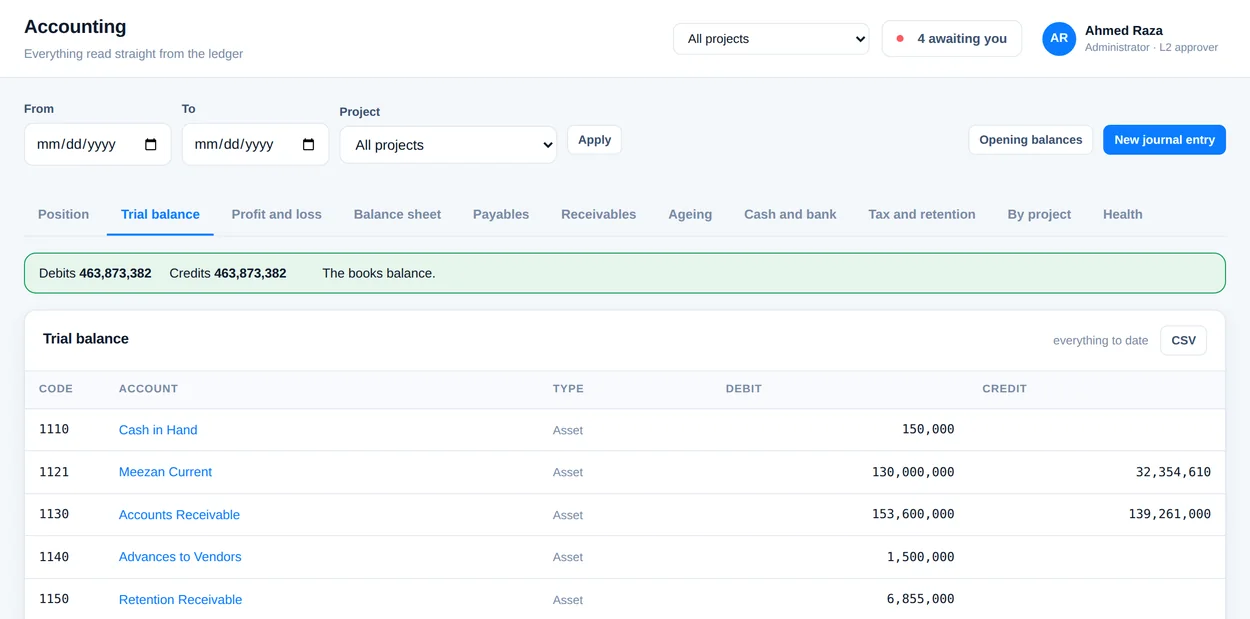
A trial balance that is true at eleven in the morning.

Because the documents post themselves, the books are never waiting on anybody. Trial balance, profit and loss, balance sheet, ageing, vendor and customer statements, cash out — all of them read the same ledger, and all of them are current as of the last approval anyone gave.

  • A construction chart of accounts installed, and yours to change
  • Opening balances for a company that is starting mid-project
  • Hand-written journal vouchers where you genuinely need one
  • Every report exports to CSV without asking anybody
axisfinancial — trial balance
The trial balance listing every account with its debit and credit totals.

The shape of it

From “we need this” to a line in the ledger, without re-typing.

Each step is filled in from the one before it. Nothing is keyed twice, so nothing can disagree.

Step 1

Someone asks

A requisition with lines, a project, a cost centre and a reason.

PR-2026-0007
Step 2

An order is raised

The approved requisition becomes a purchase order against a chosen vendor.

PO-2026-0004
Step 3

It arrives

The store says what actually turned up, in full or in part, against the lines.

GRN-2026-0005
Step 4

It is paid

A voucher against the receipt, less withholding tax and retention.

PV-2026-0001
Step 5

The ledger takes it

One balanced journal, written on final approval and never before.

JV · 4 lines
Step 6

The statements move

Trial balance, ageing and the vendor's statement, all as of now.

live

The number that matters

How much you have promised, and how much has actually landed.

Committed money is what ruins construction projects, because it is spent long before it leaves the bank. Here is the whole ladder, for a company, a project or a single cost centre.

Where the money is

Sample workspace · all projects · Pakistani rupees

Requisitioned 48,192,000
Ordered 44,760,000
Received on site 39,312,000
Invoiced by vendors 31,901,410
Actually paid 31,901,410

The 6,490,000 between what arrived and what has been billed is material sitting on site that no vendor has invoiced yet. It is a real liability and it is nowhere in your bank statement — which is exactly the number a spreadsheet never has.

More than buying

The rest of the company, built the same way.

Every module writes to the same ledger through the same door, so adding one never means another set of books.

Stores and stock

Warehouses, bins, materials and a moving-average value per item. Receipts, issues, transfers and adjustments, each posting to inventory as it happens.

People and payroll

Staff records, departments and positions, absences and personnel actions — then pay runs with your own wage types, payslips, and the journal behind them.

Financial accounting

Vendor and customer invoices parked and posted, clearing, reversals, period control, number ranges and fixed-asset depreciation runs — SAP's shape, in words.

Controlling

Cost centres and profit centres with plans against actuals, internal orders, and distribution and assessment cycles for the overheads nobody wants to argue about.

Pricing

Priced by how much you are running, not by how much you spend.

Start free on one project, for as long as you like. Move up when there are more jobs and more people.

Compare the plans in full →

Questions people ask first

How long does it take to set up?

An afternoon. Sign up, put your company's name and letterhead in, add your people and what each role may see, list your projects and cost centres. The chart of accounts is already there and is a construction one.

If you are starting mid-project, there is an opening-balance screen so the books begin where the job actually is rather than at zero.

We already keep the accounts in Excel. Why change?

Because the spreadsheet is downstream of everything. Somebody types the payment into it after the fact, and every number in it is only as good as that typing. Here the voucher is the entry — there is no second act.

Does everyone who approves need a paid seat?

Everyone who signs in counts as a user, approvers included. But approving is not a full-time job, and the plans are sized for how many people are actually in the system rather than how many documents go through it.

Can we run it on our own server?

Yes. It is ordinary PHP and MySQL with nothing to compile and no framework to keep up with — it uploads into a folder and runs. Ask us and we will send it with the installation notes.

What happens to our data if we stop paying?

It stays yours. Nothing is deleted when a subscription lapses; the workspace goes read-only and every report still exports to CSV. If you are self-hosted the question does not arise at all.

Is it only for construction?

It was built for contractors, and it shows — retention, running bills, cost centres per package, materials on site. Any business that buys against projects will recognise most of it, but the vocabulary is a builder's.
Start with one project and see what it catches.

Free for a small team, for as long as you like. No card, no call, and nothing to install — your workspace exists about ten seconds after you sign up.