AAxisFlow

Approvals & spend requests

Every rupee committed, approved by the right person.

AxisFlow sits between the person who needs something and the money that pays for it. Requests, orders, invoices and contracts each carry their own approval chain — and, six months later, a record of who was asked and why.

Set up in an afternoon · Works on a phone · Reads your accounts, never writes to them

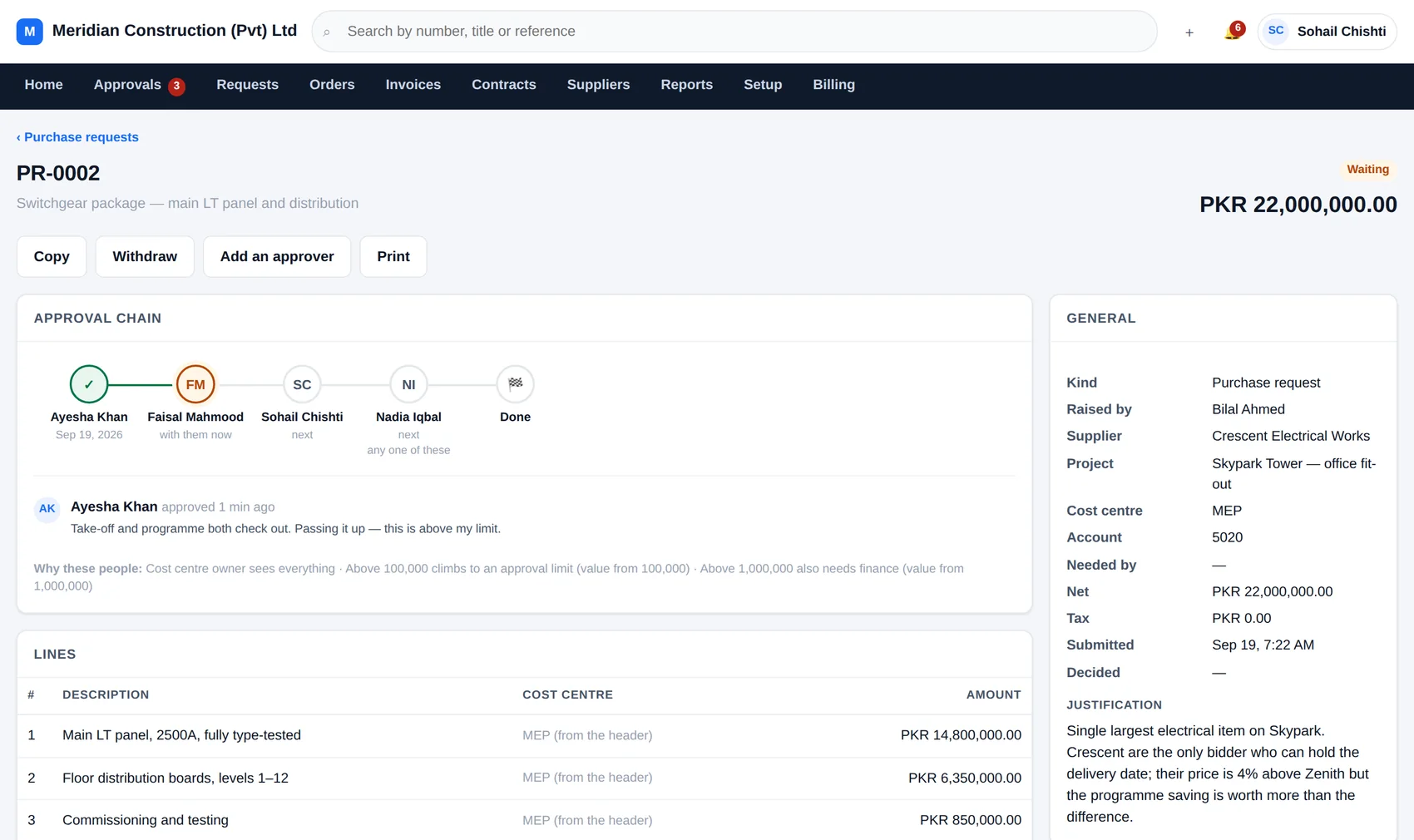
axisflow — purchase request PR-0002
A purchase request in AxisFlow showing its approval chain: Ayesha Khan has approved, it is now with Faisal Mahmood, then Sohail Chishti and Nadia Iqbal, with a note explaining which rules chose those people.
A request part-way through its chain. The line underneath says which rules put those people there.
14approval rules written for you on day one — edit them or start again
7ways to pick an approver, from a named person to climbing the management line
3-waymatching: the order, what actually arrived, and what the supplier billed
Everydecision kept — who, when, what they said, and which rule asked them

The problem

Money gets committed in WhatsApp and remembered in nobody's inbox.

A site engineer needs cable. He calls the buyer, the buyer calls the supplier, and eight weeks later an invoice arrives that nobody recognises for a price nobody agreed. AxisFlow is the three minutes in the middle that makes the other eight weeks work.

The chain builds itself

You write rules once — by value, cost centre, project, supplier or category. Every request that arrives is tested against them and the matching steps are strung together into its chain. Nobody has to remember who signs what.

It freezes on the document

The chain is stamped onto the request at the moment it is submitted. Change a rule next month and next month's requests change — what already happened stays exactly as it happened. That is what makes the record worth keeping.

And it chases people

Things sit. That is the one failure every approval system has. AxisFlow emails the person it is waiting on after a few days, and copies their manager in after a week. It never approves anything itself — it only says so.

For the person deciding

One list. Everything waiting on you, and nothing that isn't.

Open the inbox and approve, send back with a reason, or add the person who should really be looking at it. The value, the budget position and the justification are on the same screen as the button, so nobody has to go and find out before deciding.

  • Approve several at once, each decided on its own
  • Hand over to somebody while you are away — one hop, recorded in both names
  • Comment and tag a colleague in without moving the request along
  • Works properly on a phone, because approvers are rarely at a desk
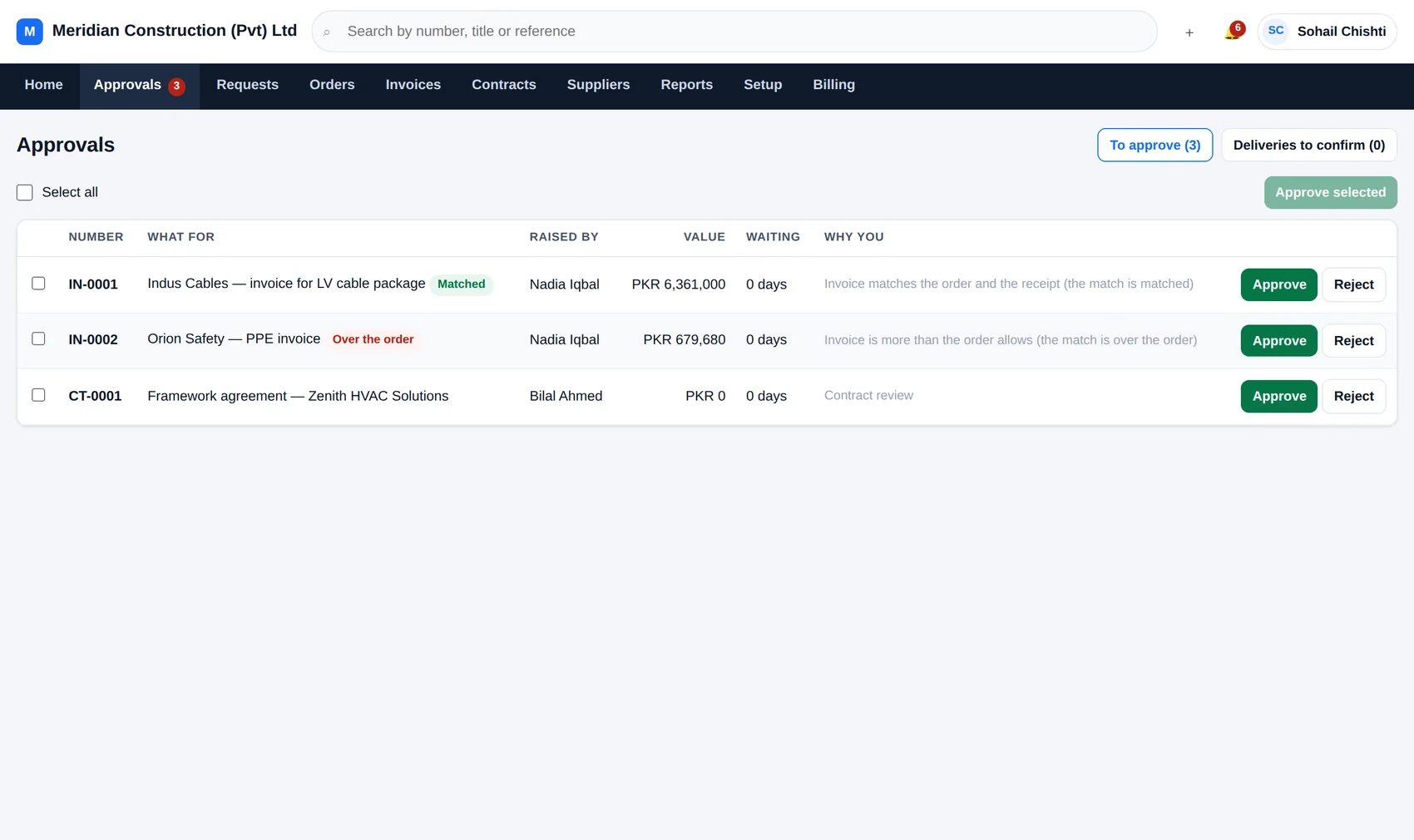
axisflow — waiting for me
The AxisFlow approvals inbox listing the documents waiting on this person, each with its value, who raised it and how long it has been waiting.

For whoever sets the policy

Rules in the words you would use to explain them.

“Anything over a million also needs finance.” “The cost centre owner sees everything.” “Above a hundred thousand, climb the management line until somebody's approval limit covers it.” Each of those is one rule, written on one screen, and you can test it against a figure before you turn it on.

  • Conditions on value, project, cost centre, supplier, category or who asked
  • Steps that name a person, a group, the cost-centre owner, the project manager, somebody's manager, or the management line up to an approval limit
  • Fourteen worked examples installed on day one — keep them, change them, delete them
  • Test any rule against a value and see the chain it would produce
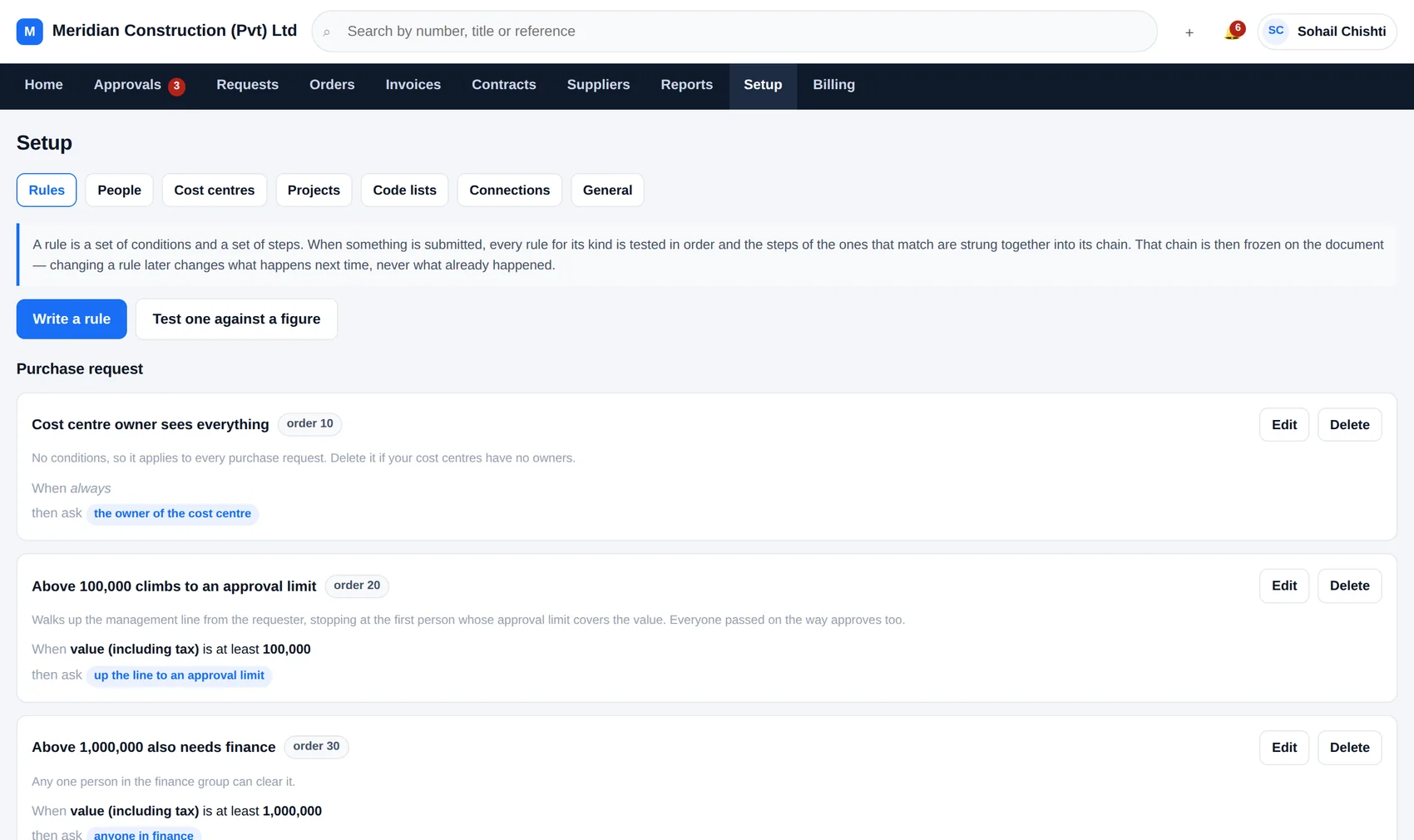
axisflow — setup, rules
The AxisFlow rules screen, listing rules such as 'Cost centre owner sees everything' and 'Above 100,000 climbs to an approval limit', each written in plain language.

For finance

An invoice that doesn't match the order doesn't quietly get paid.

Every invoice is checked against the order it belongs to and against what was actually received. Inside your tolerance it goes through. Outside it, it stops and says which of the three disagrees — before the payment run, not after it.

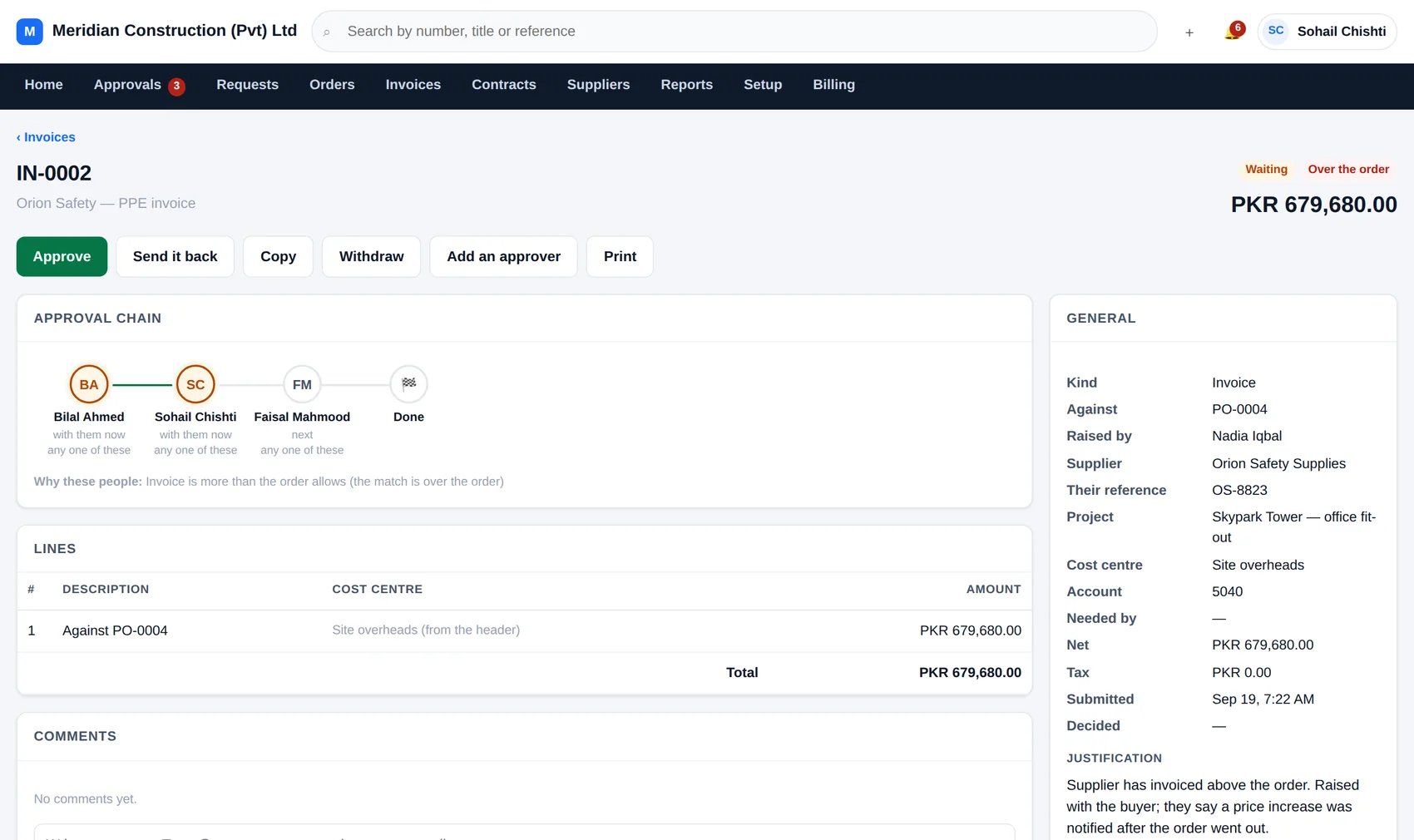
18% over the order on the invoice below — held, with the reason on the record
axisflow — invoice IN-0002
An invoice in AxisFlow marked as over the purchase order value, held for review with a note explaining the discrepancy.

The shape of it

From “we need this” to “it has been paid”, in one record.

Each step knows about the one before it. Nothing is re-typed, and the number on the invoice can be traced back to the person who first asked for the thing.

Step 1

Someone asks

A request with lines, a project, a cost centre and a reason. The quotation goes on with it.

Step 2

The chain forms

Rules are tested, the approvers are chosen, and everybody is told at once who is involved.

Step 3

It is decided

Approved, or sent back with a reason. Budget position is on the screen while the decision is made.

Step 4

An order is raised

The approved request becomes a purchase order, carrying its lines and its supplier across.

Step 5

Delivery is confirmed

Whoever received it says what arrived, in full or in part, against the order lines.

Step 6

The invoice is matched

Order, receipt and invoice compared. Agreement passes; disagreement stops and explains itself.

The number that matters

How much has been promised, and how much has actually landed.

Committed money is the number that ruins projects, because it is spent before it is spent. AxisFlow shows the whole ladder — what was asked for, what got through, what is on order, what arrived and what has been billed — for the company, a project or a single cost centre.

See the reports in full →

Where the money is

Sample workspace · all projects · Pakistani rupees

Requested 85,424,000
Approved 33,751,000
On order 33,751,000
Delivered 6,361,000
Invoiced 7,040,680

Invoiced sits above delivered because one supplier has billed for goods nobody has confirmed arriving. That is the gap AxisFlow is for — and it is holding that invoice until somebody explains it.

Alongside what you already run

It reads your accounting system. It never writes to it.

Cost centres, suppliers and actual spend are pulled across so approvers see the real budget position while they decide. Nothing goes back the other way — not a status, not a flag, not a log line. Your accounts stay the only place accounts are kept.

Your accounts

One small file in your accounting folder hands over cost centres, suppliers and what has actually been spent. Read-only, by design, and you can read the file yourself to check that.

Your project dashboard

A panel on each project showing what is committed, what is waiting and what is stuck — drawn straight from AxisFlow, without anybody signing in twice.

Nothing at all

Perfectly fine. AxisFlow keeps its own list of projects, cost centres and suppliers and works on its own from the first afternoon. Connect things later, or never.

Pricing

Priced by the size of the team, not by how much you spend.

Start free on one project. Move up when there are more of you. No charge for the people who only ever approve things.

Compare the plans in full →

Questions people ask first

How long does it take to set up?

An afternoon. Sign up, add your people and their managers, list your projects and cost centres, and look at the fourteen rules that are already there. Most companies change three or four of them and leave the rest alone.

Do approvers need their own paid account?

They need an account, and it counts towards the number of people on your plan. But there is no separate approver licence and no extra charge for somebody who only ever opens AxisFlow to say yes.

What happens to our data if we stop paying?

Nothing is deleted while the account exists. You can export everything — documents, lines, approvals, comments and history — as a single file, at any time, without asking us.

Can we run it on our own server instead?

Yes. It is plain PHP and MySQL in two folders, and it runs on ordinary shared hosting. Get in touch and we will talk about what that looks like for your team.

We already have an ERP. Why would we need this?

Most accounting systems record a purchase order beautifully and have almost nothing to say about the twenty days before it existed. AxisFlow is those twenty days: who asked, who agreed, who was ignored, and what the budget looked like at the moment somebody said yes.

Is it only for construction?

It was built for contractors, so it thinks in projects, cost centres and site deliveries. Anybody who commits money against a job rather than against a department will recognise the shape of it.
Start with one project and see what it catches.

Free for a small team, for as long as you like. No card, no call, and nothing to install — your workspace exists about ten seconds after you sign up.