AVAxisView

Live site monitoring

Where the job actually is. Not where the report said it was.

AxisView puts the programme, the progress, the photographs, the registers, the gate and the money on one screen — updated from site, not from a spreadsheet somebody remembers to send on a Friday.

Set up in an afternoon · Works on a phone · Your client can watch it, read-only

axisview — Skypark Tower, day 91 of 139
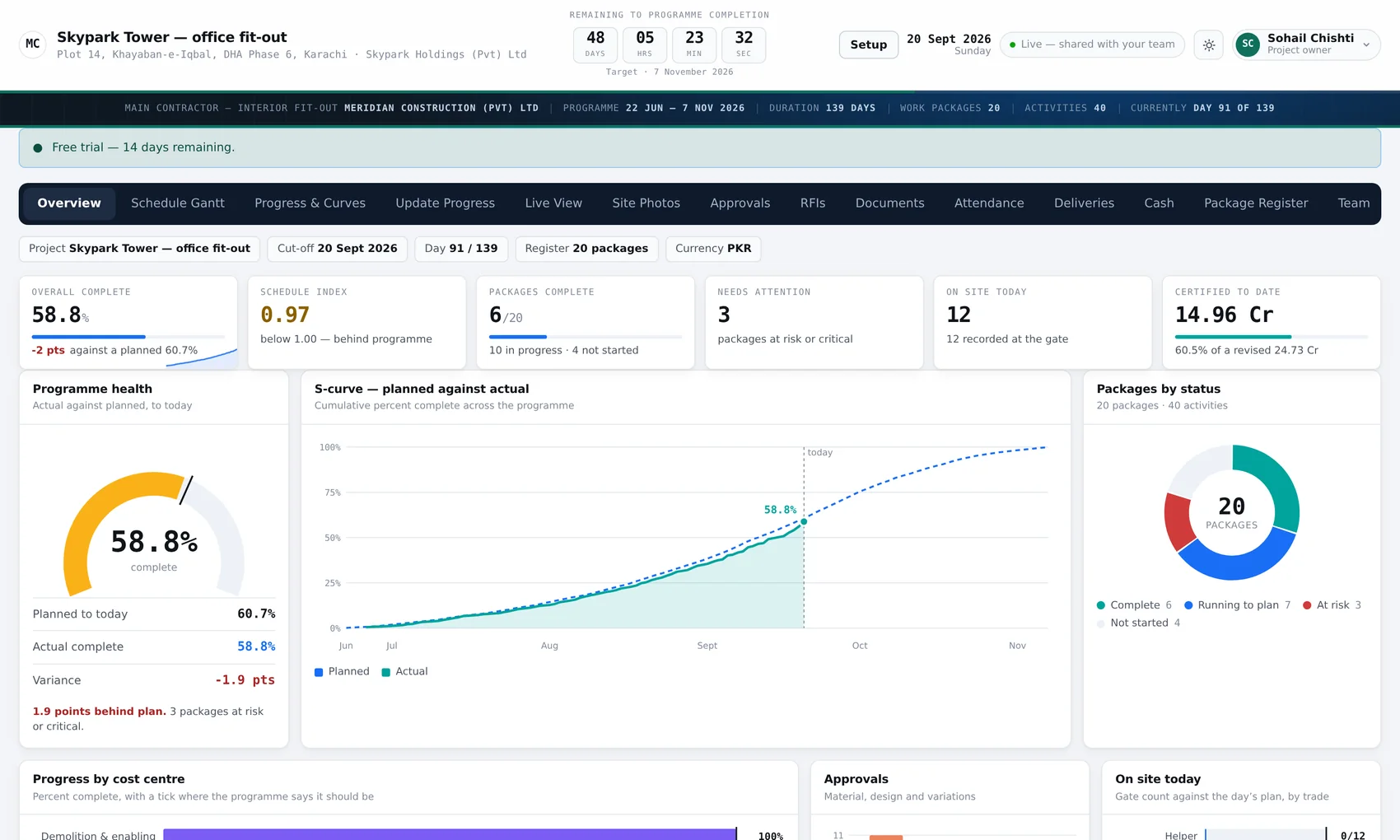
The AxisView overview screen: a countdown to programme completion, KPI tiles reading 58.8% complete and a schedule index of 0.97, a gauge of actual against planned, an S-curve of planned against actual progress, and a donut showing 20 work packages by status.
The whole job on one screen. This one is 1.9 points behind plan, with three packages at risk — and it says so before anybody has to ask.
15screens, from the Gantt to the gate — and each person sees only the ones you give them
1number that matters: actual against planned, worked out from the programme rather than typed in
3registers — material and design submittals, variations, RFIs — each with a due date that goes red
0progress emails anybody has to write, because the client is looking at the same screen

The problem

By the time the report is written, it is describing last week.

The site engineer knows where things are. The planner knows what the programme said. The QS knows what has been certified. Nobody has all three on the same day, so the meeting starts with twenty minutes of working out what is actually true.

Progress comes from the programme

Percent complete is recorded against the activity it belongs to, and rolls up through the work package to the job. The S-curve, the schedule index and the "behind by how much" are worked out from that — not typed into a summary by somebody hoping.

The evidence is attached to it

Photographs carry a zone, a work package and a date. Six months later, "what did level 7 look like on the 14th" is a question with an answer rather than an argument.

And the client is already looking

Give them a read-only sign-in and the weekly progress report stops being a thing anybody writes. They see the same screen you do, whenever they want to.

Programme and progress

A Gantt that knows what has actually been done to it.

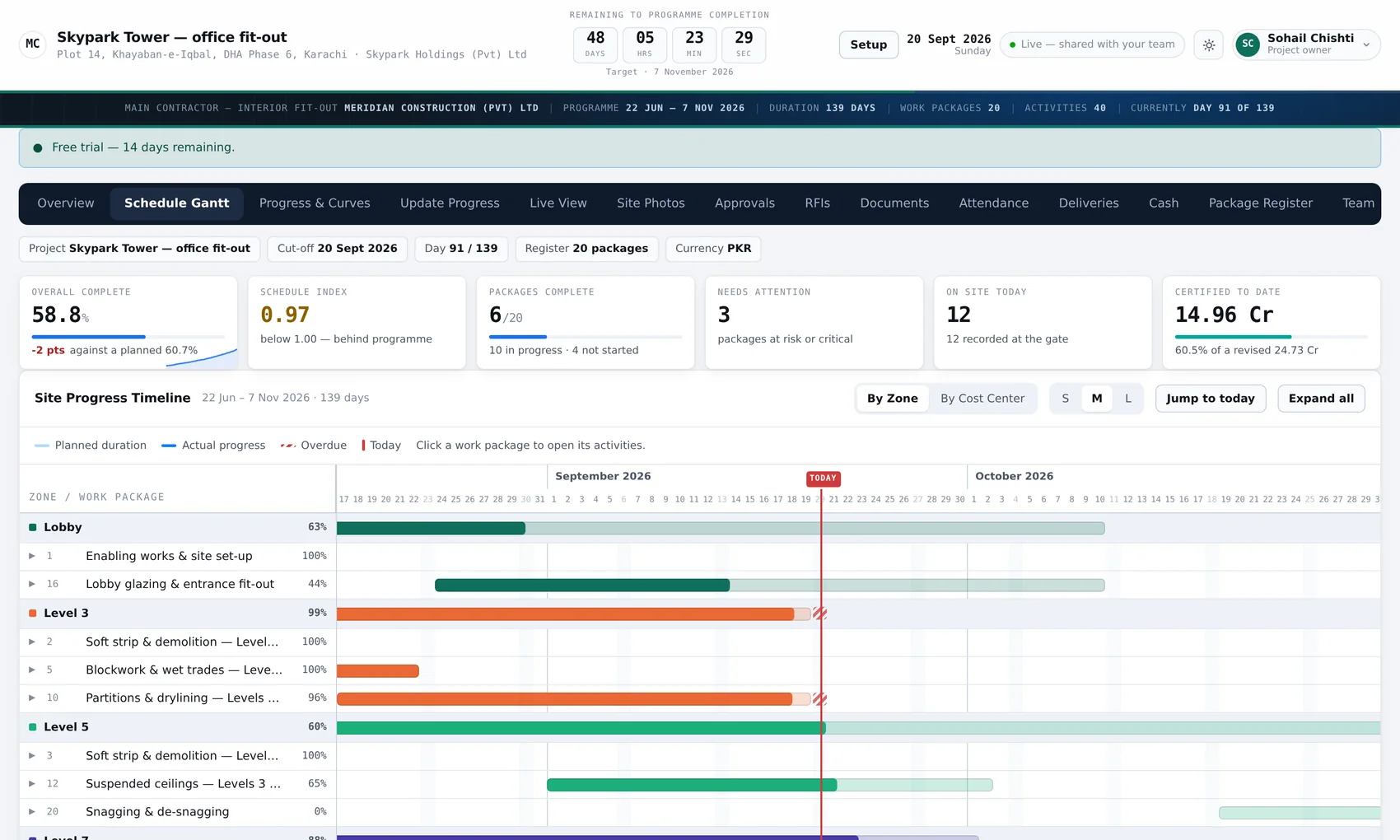
Load the programme once — packages and activities, with dates. After that the site updates percent complete against each activity, and everything else follows: the curve, the index, the float, and which packages have quietly started slipping.

  • Planned against actual, as a curve and as a single number
  • Packages marked ahead, on track, slipping or at risk — automatically
  • A look-ahead of what starts in the next fortnight
  • A countdown to the programme date, on the screen all day
axisview — schedule
The AxisView Gantt: work packages and activities down the left, bars across a date grid, with progress shaded against each bar.

The gate

Who was on site, counted by the turnstile rather than the foreman.

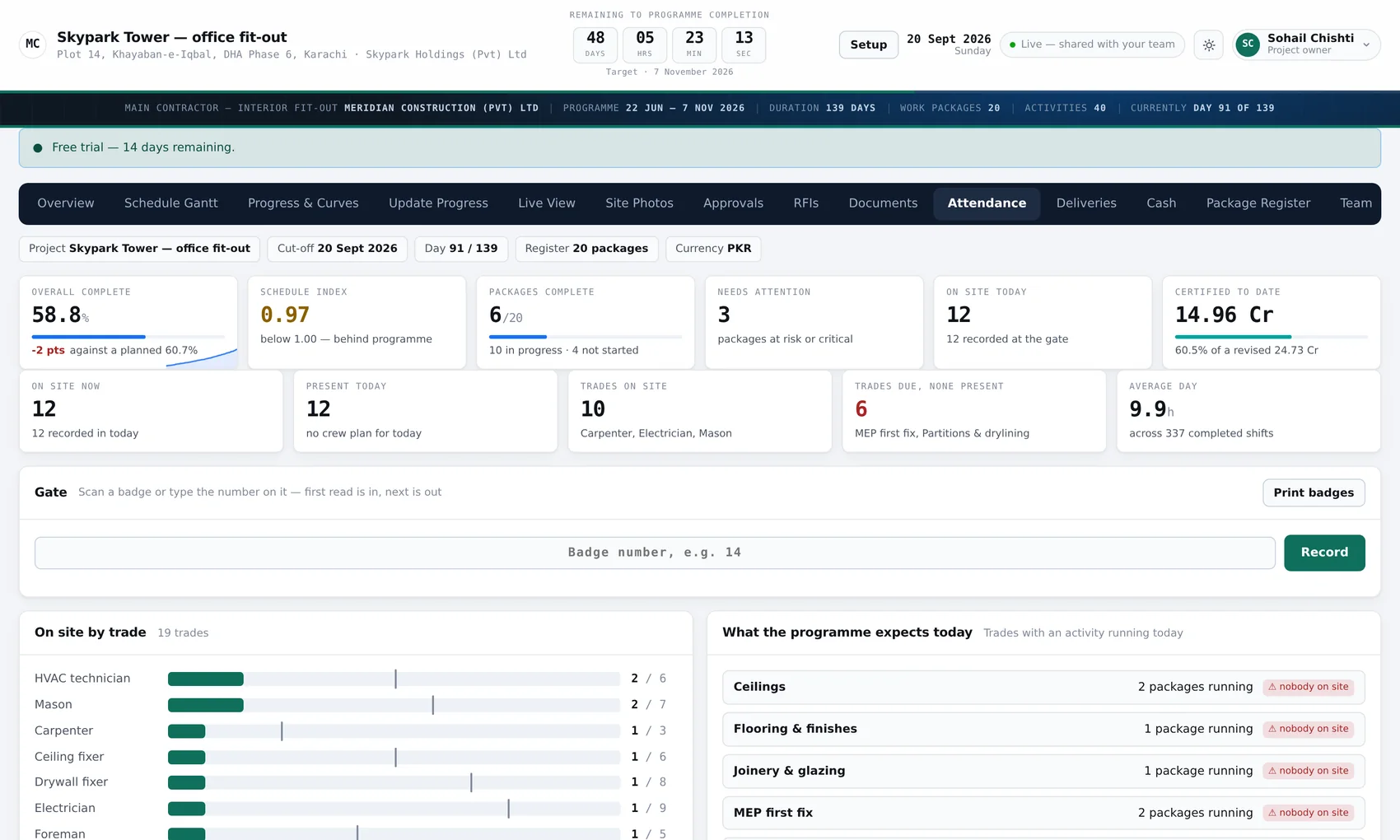
AxisView reads your access-control hardware, so attendance is what the gate recorded, by trade, against the day's plan. Deliveries are logged the same way — at the gate, received against the order, with short and over deliveries flagged rather than discovered at the invoice.

12 of 24 on site against the plan in the sample below — a gap worth knowing at 9am, not at the end of the week
axisview — attendance
The AxisView attendance screen: head-count by trade against the day's plan, with a history of man-days across the last few weeks.

The money

Contract, variations, certified, spent — beside the progress, not in another file.

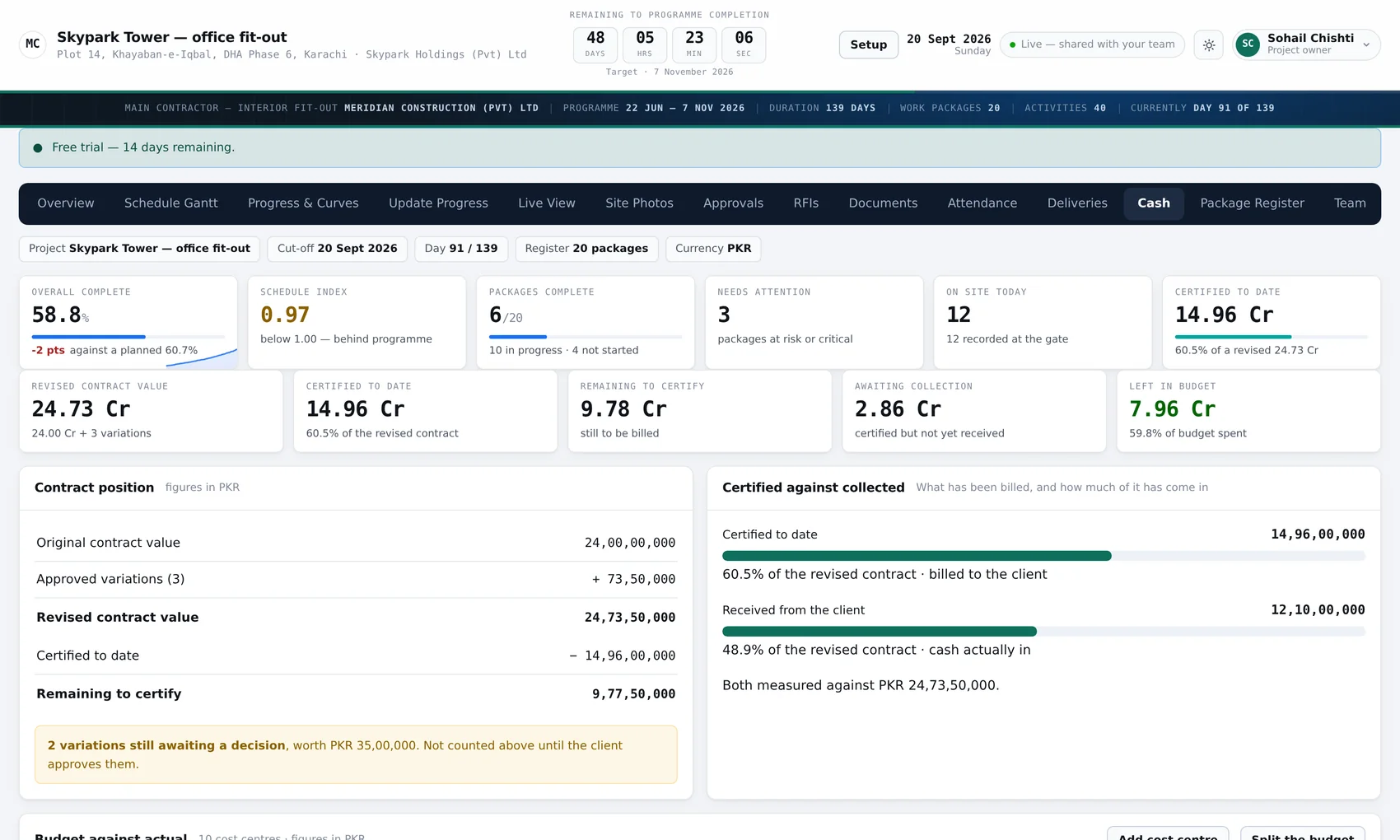
The commercial position sits on the same screen as the physical one, so the question everybody actually asks — are we earning what we are spending — has both halves in front of it. Budget by cost centre, certified to date, and what is committed but not yet certified.

  • Contract value, variations and the revised sum
  • Certified to date, as a figure and as a percentage
  • Budget per cost centre, against spend
  • Reads spend from your accounting system — and never writes to it
axisview — cash
The AxisView cash screen: contract value, variations, certified to date and spend, with budget bars per cost centre.

An afternoon to set up

From nothing to a live site, in six steps.

No implementation project, no consultant, no data migration. The wizard asks six questions and then you are in.

Step 1

Make an account

Your company, your name, and what the job is called. About a minute.

Step 2

Describe the job

Client, location, contract value, currency, start and finish. Your logo if you have one.

Step 3

Load the programme

Packages and activities with dates. Paste it in, or build it on the screen.

Step 4

Add your people

Each one gets exactly the screens you give them, and nothing else.

Step 5

Update from site

Percent complete, photographs, a delivery, an RFI. On a phone, standing up.

Step 6

Let the client in

A read-only sign-in. The weekly report writes itself, by existing.

What "60% complete" hides

One number for the job is an average of thirteen very different ones.

The headline on the sample job says 58.8%. Underneath it, demolition finished weeks ago, first fix is nearly there, and flooring has barely started. That spread is the actual conversation — and it is the one a monthly report flattens into a single percentage that reassures everybody.

See the rest of the screens →

Progress by trade

Sample workspace · Skypark Tower · day 91 of 139

Enabling & set-up 100%
Soft strip & demolition 100%
Blockwork & wet trades 99%
MEP first fix 90%
Plant room & risers 70%
Partitions & drylining 63%
Lobby glazing 44%
Suspended ceilings 39%
MEP second fix 32%
Flooring & finishes 15%
Joinery Not started

Ceilings and second fix are the two that decide whether the handover date holds. On this job they are both behind the packages that feed them, which is why three packages are flagged at risk on the screen above.

Alongside what you already run

It reads your accounting system. It never writes to it.

Spend per cost centre is pulled across so the commercial screen shows the real position rather than a figure somebody re-keyed. Nothing goes back the other way. Your accounts stay the only place accounts are kept.

Your accounts

One small read-only file in your accounting folder hands over spend by cost centre. You can open it and read it yourself to check that is all it does.

One sign-in across all of it

If your team already uses AxisFlow for approvals, or the accounting system, the same email and password works here. Matched by email address — no second password, and no list of logins to keep in step.

Or nothing at all

Perfectly fine. AxisView keeps its own people, projects and cost centres and works on its own from the first afternoon. Connect things later, or never.

Pricing

Priced by how many sites you run.

Not by contract value, not by how many photographs you take. One job is free, for as long as you like.

Compare the plans in full →

Questions people ask first

How long does it take to set up?

An afternoon. The longest part is loading the programme, and if you already have it as a list of packages and activities with dates, that is a paste rather than a retype. Everything else — the job details, your people, their permissions — is the six-step wizard.

Does the client get to see everything?

Only what you give them. Permissions are per person and per screen, so a client can have the programme, the curves and the photographs while the cash screen stays yours. There is no "client mode" you have to accept as-is.

We already use AxisFlow. Do we need another login?

No. The same email and password works here. Your account on this side is still your own — being known to AxisFlow gets you a sign-in, not access to anybody's job until somebody adds you to it.

What about the gate hardware — will it work with ours?

It reads access-control devices over the network and can also take a plain CSV if your hardware will only export. If you tell us what is on the gate we will say plainly whether it will work before you pay for anything.

Can we get our data out?

At any time, from inside the app, without asking us. It is your record of your job and you should never need our permission to hold a copy of it.

Can we run it on our own server?

Yes. It is plain PHP and MySQL in two folders and runs on ordinary shared hosting. Get in touch and we will talk about what that looks like.

Put one job in and see what it tells you.

Free for one site, for as long as you like. No card, no call, and nothing to install — your project exists about a minute after you sign up.